
Explainer video · Scoping guide
To scope an AI explainer video, lock seven decisions before the brief is approved: the one job the video does, the one audience, the runtime, the script spine, the visual treatment, the revision rounds, and the language versions. Every one you leave open pushes the production clock back, because nothing can be estimated underneath an unresolved decision.
On this page
- What scoping actually means here
- The seven decisions that close a brief
- Script structure that actually explains
- How long a 60-90 second explainer really needs to be
- When animation beats live-action-style AI
- What each decision costs you in time
- The scoping session, step by step
- What people are actually saying
- How ArcaneWiz scopes an explainer
- FAQ
What scoping actually means here — and why it is not shopping
Scoping is the work of deciding what the video is, before anyone quotes it, writes it or generates a frame. It is not vendor selection and it is not budgeting. If you are still comparing studios, the qualifying questions live in how to qualify an AI video studio for B2B SaaS, and the number side is already covered in what an AI explainer video costs in 2026 and the cost guide broken down by length. This page is about the decisions those two conversations depend on.
The reason scoping gets skipped is that it feels like paperwork and the AI tooling feels instant. It is not instant where it matters. Generative video collapses the cost of producing a frame; it does not collapse the cost of deciding which frame, in what order, saying what, to whom. That decision load is unchanged from traditional production, and on an AI pipeline it actually concentrates earlier, because regenerating a sequence after the fact is far more disruptive than re-cutting one.
If you cannot state the video’s job in a single sentence that contains no “and”, you are scoping two videos. Split them, or pick one. Every problem further down this page is downstream of that sentence being vague.
The seven decisions that have to close before a brief is approved
A brief is approvable when seven things are no longer open. They are listed here in the order they should be settled, because each one narrows the next. Reordering them is where most explainer projects lose a week.

- The jobOne outcome. Convert a trial signup, reduce support tickets on one feature, get a room of investors to understand what the product does in ninety seconds. Not “raise awareness”.
- The audienceOne viewer, described specifically enough that you can guess their vocabulary. “Ops managers at logistics firms who already use spreadsheets for this” is a scope. “B2B decision-makers” is not.
- The runtimeSet before the script, not after. Runtime is a constraint that improves scripts; discovered runtime is just an unedited script.
- The script spineWhich four beats carry the explanation, and which single sentence is the mechanism beat. See the next section.
- The visual treatmentThe ratio of animated or diagrammatic sequences to live-action-style generated footage, plus whether the interface appears on screen at all.
- The revision roundsHow many, and at which stages. Two is the workable default: one on script and storyboard, one on the assembled cut.
- The language versionsDecided now, not after the master is delivered. This changes how the script is written and how on-screen text is built.
Language versions. It looks like a post-production question and it is not. Copy timed to 75 seconds in English can overrun in German or Hebrew, and text baked into a generated frame cannot be swapped without regenerating the shot. Deciding this at scoping costs a sentence; deciding it after delivery costs a rebuild. If localisation is even a possibility, say so — that is what AI voiceover and video localization is scoped around.
Script structure that actually explains: the four-beat spine
Most explainer scripts that fail do not fail on writing quality. They fail because they describe a product instead of explaining a mechanism. The structure below is deliberately rigid, because rigidity is what forces the mechanism beat to exist.
| Beat | What it does | Typical share of a 75-second cut | Failure mode |
|---|---|---|---|
| Situation | Names a state the viewer already lives in, so they self-identify inside the first five seconds. | 10-15 seconds | Starts with the company, not the viewer. |
| Friction | Names the specific cost of that state — time, error rate, handoffs, revenue leaking somewhere nameable. | 10-15 seconds | Generic pain (“it’s inefficient”) that could describe any product. |
| Mechanism | Shows how the thing works, concretely enough that the viewer could explain it to a colleague. | 30-40 seconds | Skipped entirely, replaced by adjectives and UI b-roll. |
| Next action | One instruction. One destination. Spoken and on screen. | 5-10 seconds | Three competing CTAs, so none of them land. |
The mechanism beat is the whole video. It is also the beat that determines your visual treatment, which is why decision four has to close before decision five. If the mechanism is a flow of data between systems, you are building a diagram sequence. If the mechanism is a person doing something differently, you are building live-action-style footage. You cannot pick the treatment until you can say the mechanism in one sentence.
“It works by ______.” If the blank takes more than about twenty words to fill, the explainer is scoped too wide, or you are explaining a platform when you should be explaining one feature of it. Splitting into a short series is usually cheaper in time than forcing one long cut.
How long should an AI explainer video be? The 60-90 second band, and when to break it
The 60-90 second band is a default with evidence behind it, not a convention. Wistia states in its 2026 State of Video Report — drawn from over 13 million videos and 79 million hours of viewing data on its platform — that the shorter the video, the higher the engagement rate, and defines engagement rate as how much of a video people watch on average. In its separate guide to choosing video length, Wistia states that videos under a minute average a 52% engagement rate. That share is the number that matters for an explainer: a video nobody finishes has not explained anything.
That does not mean shorter is always right. It means length has to be earned by the mechanism, and the mechanism is the only thing allowed to buy it. Three practical bands:
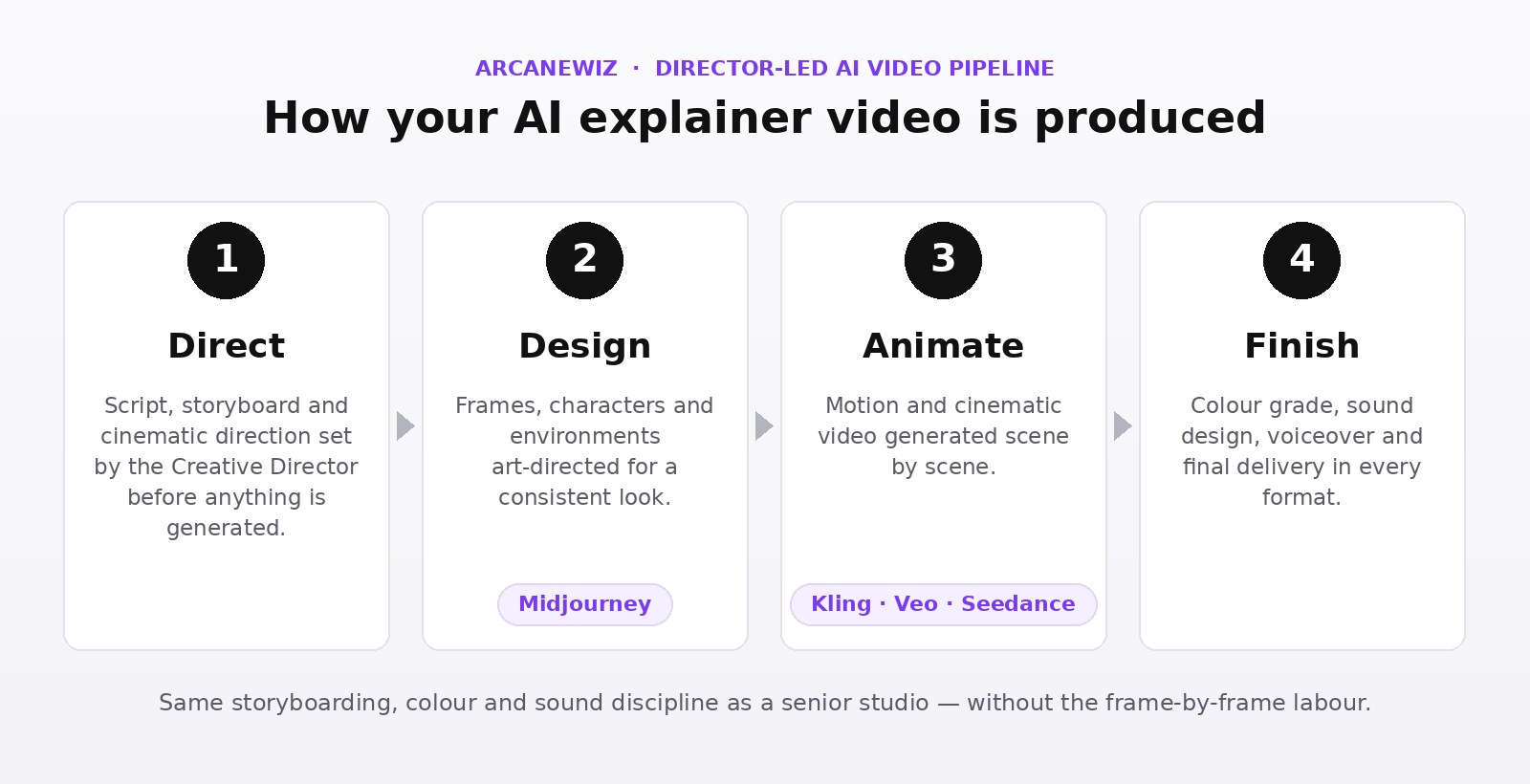
There is a production reality under this too. Generative models do not hand you a finished 75-second film; they produce short shots that a human then assembles into a sequence. A 75-second explainer is therefore a deliberate edit of many short generated takes, ordered and paced against a storyboard that existed before any of them were generated. That is a craft problem rather than a prompt problem, and it is the other reason the storyboard has to be locked first: an edit can re-time a shot, but it cannot invent the shot that was never scoped.
When animation beats live-action-style AI — and when it does not
This is decision five, and it is usually made on taste when it should be made on subject matter. The rule is simple: animate what is invisible, shoot what is physical.
| If the mechanism is… | Treatment | Why | Scope consequence |
|---|---|---|---|
| Data, logic, money or policy moving between parties | Animated / diagrammatic | There is nothing to point a camera at. A diagram shows the relationship; footage can only gesture at it. | More storyboard time, less generation time. Text on screen must be treatment-separated for localisation. |
| A person’s day changing, a physical space, a product in the world | Live-action-style AI | Believability carries the argument. The viewer needs to picture themselves in the frame. | More generation and grade time; continuity across shots becomes the main risk to manage. |
| A software interface the viewer will actually use | Screen capture, directed | Never generate an interface. Real screens, composed and paced like cinematography. | Requires a working build or staged environment before the shoot day equivalent. |
| A mix — most real products | Hybrid, ratio fixed at scoping | Diagram the invisible part, shoot the human part, cut between them on a deliberate rhythm. | The ratio must be a number in the brief, or the edit drifts and the cut feels like two videos. |
The third row is the one buyers get wrong most often, and it is worth being blunt about: a generated approximation of your product’s UI is a liability, not a shortcut. If the explainer shows the interface, the interface has to be the real one. That is the same principle that governs a product demo video, and it is why demo and explainer are scoped as separate assets rather than one.
What each decision costs you in time if you leave it open
Every unresolved decision has a price in schedule, and the price is not linear — it multiplies depending on how late it is resolved. This is the practical argument for scoping as a distinct stage rather than a conversation that happens alongside production.
- Job undecided at brief stage: the brief cannot be approved at all. The production clock has not started, and nothing in it can start.
- Audience undecided at script stage: the script is written to a composite viewer and reads as generic. Rewrite, not revision — the spine changes.
- Runtime undecided at script stage: the script arrives long, and cutting it after approval means cutting a beat, usually the mechanism beat, which is the one you needed.
- Treatment undecided at storyboard stage: storyboard has to be redrawn, because a diagram sequence and a live-action sequence are not interchangeable frames.
- Treatment undecided after generation starts: generated material is discarded. This is the single most expensive open decision on an AI pipeline.
- Revision rounds undecided: they get negotiated during the edit, which is the worst possible moment to negotiate anything.
- Language versions undecided after the master is delivered: timeline rebuild, and any text baked into generated frames has to be regenerated.
The scoping session, step by step
At ArcaneWiz this is a single working session before any estimate is issued, and it runs in a fixed order. You can run the same sequence internally before you approach any studio.
- State the job and the viewerOut loud, in one sentence each, with no conjunctions. If the room disagrees, you have found the real scoping problem and it is not a video problem.
- Watch the product workA live walkthrough or a recorded demo. No one can write a mechanism beat for something they have not seen operate. This is the input most often missing, and the most common cause of delay.
- Write the “it works by ______” sentenceTwenty words or fewer. This becomes the spine of the script and the brief for the visual treatment simultaneously.
- Set the runtime bandChosen from the three bands above, justified by the mechanism’s complexity rather than by what the budget seems to allow.
- Fix the treatment ratioAn actual number — for example, roughly 60% diagrammatic and 40% live-action-style — written into the brief so the edit has something to be held against.
- Fix rounds, versions and constraintsRevision rounds, language versions, and any compliance or brand constraints.
- Approve the briefThis is the moment the delivery clock starts — 7-10 working days from an approved brief to a delivered master.
What people are actually saying
The scoping problems above are not house theory; they show up repeatedly in public discussion of AI explainer tooling. Three threads are worth reading in full.
On the Hacker News launch thread for Golpo, a YC-backed AI explainer video generator, the most substantive feedback was not about output quality but about scope control. One commenter, having generated a product explainer for a rover they were building, reported that “the rover looked different in every scene” and suggested that supplying a reference image might have helped — the continuity problem that a locked storyboard and a fixed treatment ratio exist to solve. Another told the founders to rethink their demo videos because “the technical diagrams don’t stay on the screen long enough for new learners to process the information”, which is a pacing decision made at storyboard, not a generation setting.
On the Show HN thread for a tool generating 3blue1brown-style explainer videos, a commenter who asked it to explain the Cantor function complained that the result was “laughably short” for the topic — a clean illustration of the point above, that runtime has to be earned by the mechanism rather than inherited from a default. Several others in the same thread noted overlapping on-screen text and explanations that were confidently wrong, both of which are failures of direction rather than of the model.
And in a 2025 discussion titled “AI video generation is a threat to freelance editors”, the prevailing view ran the other way. One commenter argued that “the tools give you a draft” and that generated footage makes editors more important rather than less; another, evaluating several consumer AI video generators, wrote that they “still lack the accuracy and attention to detail that professional video editors bring to the table”. That is the same conclusion scoping is built on: the generation step is cheap, and the directorial decisions around it are where the video is actually made.
How ArcaneWiz scopes an AI explainer video
We are explicit about the pipeline, because scoping only works if you know what you are scoping. Image and style development runs through Midjourney; motion is generated with Kling, Veo and Seedance. Around that, the work is conventional and director-led: storyboarding, shot design, edit, colour grade and sound design, supervised by a Creative Director with more than twenty years in traditional production. AI tooling is used, and we say so on every project.
Practically, that means the scoping session produces four artefacts before an estimate exists: the job sentence, the mechanism sentence, the runtime band and the treatment ratio. Explainer production starts From $1,500, with the final figure set by the treatment ratio and the number of versions rather than by runtime alone; the full breakdown of what moves that number lives in the two cost guides linked at the top of this page. Delivery is 7-10 working days from an approved brief to a delivered master.
If you want the service-page view of the format rather than the scoping view, see AI explainer video production. If you are weighing the format against a traditional studio, AI explainer video vs a traditional animation studio covers that comparison directly. Sector-specific scoping differs in useful ways — see AI video for SaaS for product-led contexts and AI video for education and EdTech where the mechanism beat carries pedagogical weight. Client work to date includes Samsung Israel, Anipet, Fun Forest, Homey Panda and SolarEdge.
Bring the four sentences, not a brief
The job, the viewer, the mechanism and the runtime. We will scope the rest with you in one session.
Frequently asked questions about scoping an AI explainer video
How do you scope an AI explainer video before writing a brief?
Scoping an AI explainer video means fixing seven decisions before anyone writes a brief: the single job the video must do, the one audience it speaks to, the runtime, the script spine, the visual treatment, the number of revision rounds, and the language versions. Each decision closes off a branch of production. Leave one open and the brief cannot be approved, because the estimate underneath it has no floor.
How long should an AI explainer video be?
Most product explainers land between 60 and 90 seconds, because that is long enough to state a problem, show a mechanism and close, and short enough that viewers finish it. Wistia’s guide to choosing video length states that videos under a minute average a 52% engagement rate, and its 2026 State of Video Report states that the shorter the video, the higher the engagement rate. Longer runtimes are justified by complexity, not by ambition.
What goes into an AI explainer video script structure?
A working explainer script has four beats: the situation the viewer already recognises, the specific friction inside it, the mechanism that removes the friction, and the single next action. The mechanism beat is the one that earns the word explainer, and it is the beat most drafts skip. If your script cannot name the mechanism in one sentence, the video will describe a product rather than explain it.
When is animation a better choice than live-action-style AI for an explainer?
Animation wins whenever the thing you are explaining is invisible: data moving between systems, a pricing model, a policy, an API, a chemical or financial process. Live-action-style AI wins when the subject is physical, human or environmental, and when the viewer needs to believe a real person uses the product. Most explainers end up hybrid, and deciding the ratio at scoping is what keeps the edit coherent.
How many revision rounds should an AI explainer video scope include?
Two rounds is the workable default: one on the script and storyboard before any frame is generated, and one on the assembled cut. Rounds bought after the cut exists cost far more time than rounds spent on the storyboard, because a storyboard note changes a drawing and a cut note changes generated footage, voiceover timing and grade together. Fix the number at scoping so it is not negotiated mid-production.
What do you need to give a studio before an explainer brief can be approved?
You need four inputs: a one-sentence statement of what the viewer should do after watching, the audience’s actual vocabulary, a product walkthrough or working demo, and your brand assets with any legal or compliance constraints attached. Missing the walkthrough is the most common delay, because no one can write a mechanism beat for a product they have not seen operate.
How long does an AI explainer video take to produce?
Standard delivery at ArcaneWiz is 7-10 working days from an approved brief to a delivered master. The clock starts at approval, not at first contact, which is exactly why scoping is treated as its own stage. Unresolved decisions do not compress the production window; they sit in front of it, and a brief that arrives with open questions simply waits longer to be approved.
Does scoping change if the explainer needs multiple language versions?
Yes, and it has to be decided before the script is locked rather than after. Multilingual delivery changes how the script is written, because copy that fits 75 seconds in English can overrun in German or Hebrew, and it changes how on-screen text is built so it can be swapped without regenerating footage. Deciding it later means rebuilding the timeline.
Is AI used to generate the whole explainer video?
No. ArcaneWiz uses AI tooling openly and says so: Midjourney for image and style development, and Kling, Veo and Seedance for motion. Storyboarding, shot design, edit, colour grade and sound are directed by a human Creative Director. The tools generate material; the craft decisions about structure, pacing and what the viewer understands are made by people.
What is the difference between an explainer video and a product demo video?
An explainer answers why this matters and how it works for someone who does not yet use the product; a demo shows an existing or near-ready buyer what the interface actually does. They serve different funnel positions and should be scoped separately. Trying to make one asset do both is the most reliable way to produce a video that converts nobody.
What happens if the product changes after the explainer is scoped?
It depends which beat the change touches. A change to the interface or a screen usually affects a shot or two and is absorbable. A change to the mechanism, the pricing model or the audience invalidates the script spine and means re-scoping, not re-editing. Naming that boundary at scoping is what prevents an argument about it later.
How do you know an explainer scope is too big?
Check whether you can state the video’s job in one sentence without the word and. If it takes two clauses, you are scoping two videos. The other reliable signal is the audience: if you cannot describe one viewer, one moment and one next action, the runtime will inflate to cover the ambiguity and the finished piece will explain nothing clearly.
- Wistia — 2026 State of Video Report (engagement-rate trend, definition and sample) and How to Choose the Right Marketing Video Length for Any Goal (the sub-one-minute engagement figure).
- Hacker News discussions: Launch HN: Golpo — AI-generated explainer videos, Show HN: AI that generates 3blue1brown-style explainer videos, AI video generation is a threat to freelance editors.