
Kling Motion Control: How it works, what it costs and when to use it
Kling Motion Control copies the movement in a reference video onto a character from a single image.
- Reference videocamera tooone person, 3–30 s
- Character imagepose tooone image, jpg or png
- Promptcamera tooscene, light, style
- Length
- up to 30 sup to 10 s
- Facing
- the video’sthe image’s
- Camera
- follows the videofrom your prompt
- Face binding (3.0)
- availablenot available
What is Kling Motion Control, at a glance?
The person in your image performs the same body moves, hand gestures and facial expressions, in a scene you describe in a prompt. It runs on Kling VIDEO 2.6 (launched 17 December 2025) and VIDEO 3.0 (March 2026), which adds face binding for a steadier identity. On Kling’s own plans VIDEO 3.0 costs 9 credits a second in Standard mode and 12 in Professional; free routes exist, with limits.
| What it does | Applies the body movement, hand gestures and facial expressions of a person in a video to the character in your image. |
|---|---|
| What you give it | A reference video, one character image and an optional prompt of up to 2,500 characters. |
| Reference video | 3 to 30 seconds, one person, one continuous shot; mp4 or mov up to 100 MB. |
| Character image | jpg or png up to 10 MB, at least 300 px on the short edge. |
| Output | Up to 30 seconds when the character follows the video’s orientation, up to 10 when it keeps the image’s. 720p in Standard mode, 1080p in Professional. |
| Models | Kling VIDEO 2.6 (launched 17 December 2025) and VIDEO 3.0 (March 2026, adds face binding). |
| Price on Kling | VIDEO 3.0: 9 credits a second in Standard mode, 12 in Professional. Paid plans from $8.80 a month for 660 credits. |
| Free route | Kling’s free plan is watermarked and not for commercial use. Wan 2.2 Animate is open source; Viggle has a free plan. |
| Where to use it | Kling’s web app and mobile app, the Kling API, and inside other tools: Runway, ComfyUI and API hosts such as fal. |
Facts and prices checked on 19 November 2026.
How does it work?
Motion control splits a shot into what moves and who moves. The video supplies the performance, the image supplies the performer, and the prompt supplies everything around them.
The motion
A clip of one person moving: your own footage, or a clip from Kling’s Motion Library. It carries the body movement, hand gestures, facial expressions and lip movement, and in the default mode the camera move as well.
The character
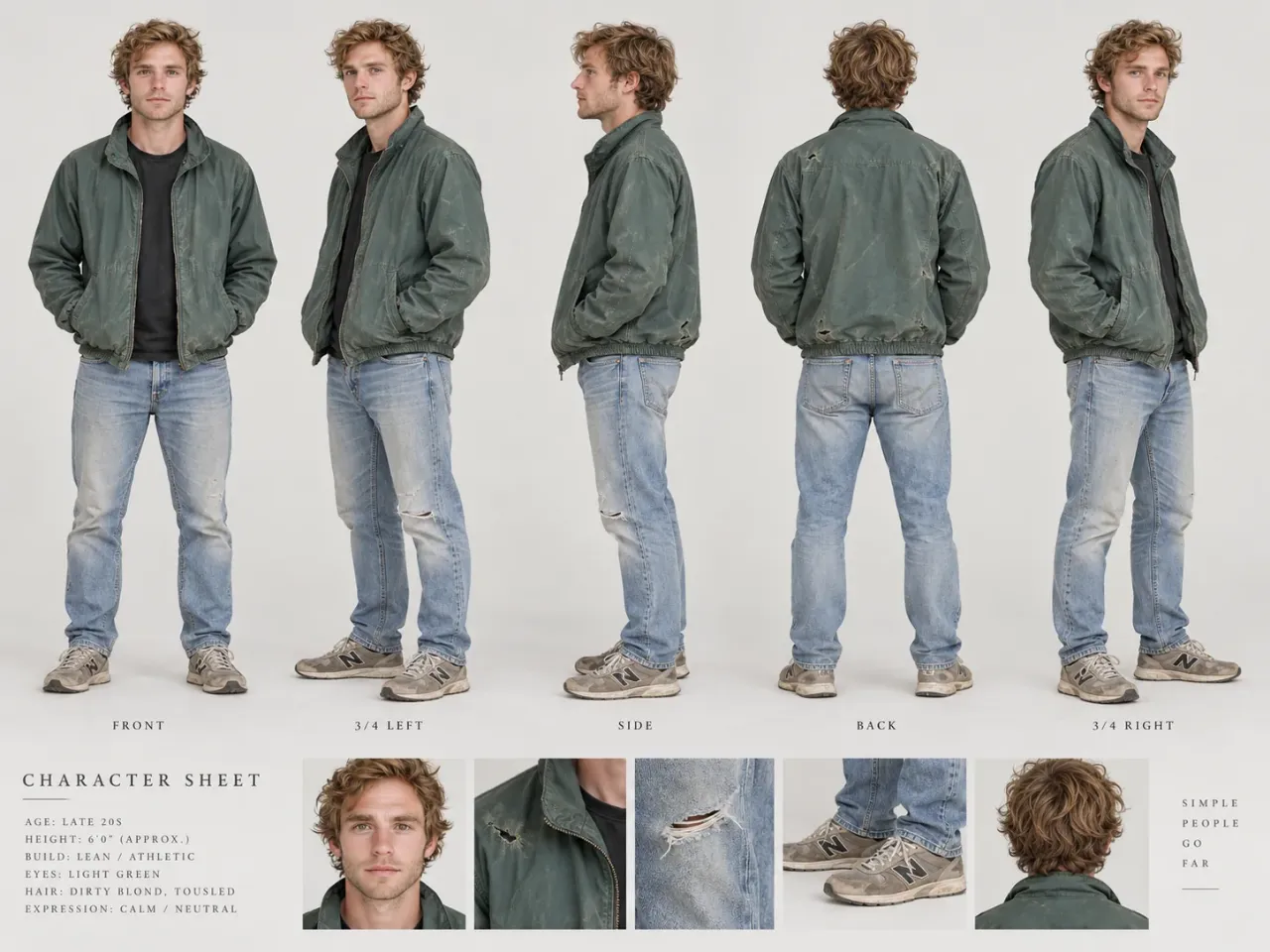
One image of whoever should perform. Real people work best; stylised humans and animals can work, less predictably. Frame it like the video: full body for full-body motion, half body for half.
The prompt
The scene, the light, the wardrobe, the style. Kling’s own advice is not to describe the action: the video already carries it.
The two orientation modes
- Default
Character orientation matches video
Movement, expressions, camera moves and the way the character faces all follow the video. Clips run up to 30 seconds, and on VIDEO 3.0 this is the only mode that takes a bound face.
Character orientation matches image
Movement and expressions come from the video, but the character keeps the pose and facing of your image, and the camera moves as your prompt says. Clips run up to 10 seconds.
Which Kling version does motion control?
| Model | Released | What it brings to motion control |
|---|---|---|
| VIDEO 2.6 Motion Control | 17 December 2025 | The first version: whole-body motion, hands and faces from a reference video onto one image, up to 30 seconds in one take. |
| VIDEO 3.0 Motion Control | March 2026 | Face binding: build a face element from several photos or a short video, and the face holds from every angle, through strong expressions and when partly covered. 9 credits a second in Standard, 12 in Professional. |
| Kling 4.0 | 15 October 2026 | No separate Motion Control mode in its launch notes. Its general generator takes up to five reference videos, 30 seconds combined, and Kling says a reference video can guide performance, camera movement or pacing. |
Kling’s Motion Control user guide lists VIDEO 3.0 and 2.6. For one character copying one performance, that is the tool; for a shot that mixes several references, Kling 4.0’s reference inputs are the newer route.
How do you use it in Kling?
Step 1: Open Motion Control
In Kling’s web app or mobile app, open Motion Control and pick the model: VIDEO 3.0 when the face has to hold, VIDEO 2.6 otherwise.
Step 2: Add the motion
Upload a clip of 3 to 30 seconds with one person in it, or pick one from the Motion Library.
Step 3: Add the character
Upload the character image, framed like the video: full body for full body, half body for half.
Step 4: Choose the orientation
Leave it on matches video for clips up to 30 seconds with the video’s camera, or switch to matches image to keep your image’s pose, up to 10 seconds.
Step 5: Bind the face (VIDEO 3.0)
Under the character image, bind a face element: a set of face photos (front, both profiles, a smile, a look up and down) or a short video of the face. Matches video only.
Step 6: Write the prompt and generate
Describe the scene, light, wardrobe and style, choose Standard (720p) or Professional (1080p), and generate. Kling charges by the second of output.
What makes a clean result, and where does it break?
The reference video
- One person. With more, Kling takes whoever fills most of the frame.
- One continuous shot from a steady camera. A cut ends the clip early.
- Moderate speed. Very fast or complex moves come out less reliably, sometimes shorter.
- The whole body and the head in view, clear against the background.
- In Runway and through the API its original sound is kept unless you switch it off.
The character image
- The same framing as the video. A face close-up driven by a full-body dance fails or distorts.
- Room around the character for the move.
- Head, hands and feet unobstructed. Hidden limbs invite drift in the face or the proportions.
- A real person works best. Stylised characters and animals are less predictable.
- No extreme orientations: not upside down, not lying flat.
What does it cost?
9credits a secondVIDEO 3.0, Standard mode (720p). Professional (1080p): 12.
Kling bills motion control by the second of output, rounded to the nearest second. A 10-second clip in Standard mode is 90 credits; in Professional, 120.
| Clip | Standard | Professional |
|---|---|---|
| 5 seconds | 45 | 60 |
| 10 seconds | 90 | 120 |
| 30 seconds | 270 | 360 |
Credits come with a plan. On Kling’s plan page on 19 November 2026: Standard $8.80 a month for 660 credits, Pro $32.56 for 3,000, both after an introductory price. 660 credits make about seven 10-second Standard clips, before any retakes.
Developers pay by the second through API hosts: $0.07 for VIDEO 2.6 Standard on fal, $0.13 for VIDEO 3.0 on Vercel’s AI Gateway.
Is there a free way?
| Tool | Made by | What it takes | Price | Free route |
|---|---|---|---|---|
| Kling Motion Control | Kuaishou | A reference video, one image, a prompt | 9 to 12 credits a second (VIDEO 3.0) | Free plan: watermarked, no commercial use, no 1080p |
| Runway Act-Two | Runway | A performance video and a character image or video | 5 credits a second, 3-second minimum, up to 30 seconds | None: Standard plan or higher |
| Wan 2.2 Animate | Alibaba’s Wan team | A reference video and a character image; it can also replace the person in a video | Free, open weights (Apache 2.0) | Run it on your own GPU or in ComfyUI |
| Viggle | Viggle | A character image and a motion video | From $7.99 a month, billed yearly | Free plan, credits that refresh daily |
Free has a price: Wan 2.2 Animate needs a capable graphics card and setup time, and every free tier here limits use or output. Runway also runs Kling 3.0 Motion Control inside its own app.
Whose rights are in the shot?
At least two people’s. Every motion-control clip has a performer, the person in the reference video, and a character, whoever or whatever the image shows. To publish it you need the right to use both: the performer’s consent and release, and the rights to the face, character or brand in the image. Kling’s free plan rules out commercial use altogether; its paid plans allow it.
When should a studio direct it?
Motion control solves one shot: a character doing one specific move. A film needs more: a story, characters who stay the same person from shot to shot, camera moves that mean something, an edit with rhythm and sound that lands.
At ArcaneWiz, Daniel Atzil and his team choose the model and the technique for every shot, and Kling is one of the models they work with; our broadcast-quality commercial for a luxury brand was made with Kling 3.0 (read the case study). Daniel is a filmmaker with more than 20 years in cinema.
AI video production at ArcaneWiz starts from $3,000 (see pricing), delivered in 7–10 working days from an approved brief.
Films by Daniel Atzil and his team

Questions and answers: what else do people ask?
What is Kling Motion Control?
A mode in Kling AI that copies the movement in a reference video onto a character from a single image. The character performs the same body moves, hand gestures and facial expressions in a scene you describe in a prompt. It runs on Kling VIDEO 2.6 and VIDEO 3.0.
Is Kling Motion Control free?
Not for real use. Kling’s free Basic plan is watermarked, does not allow commercial use and has no 1080p. Paid plans start at $8.80 a month for 660 credits, and VIDEO 3.0 Motion Control costs 9 credits a second in Standard mode and 12 in Professional (Kling, checked 19 November 2026).
How long can a Kling Motion Control video be?
The reference video can run 3 to 30 seconds. With the character orientation set to match the video, the output can run up to 30 seconds; set to match the image, up to 10 seconds.
What is the difference between Kling 2.6 and 3.0 Motion Control?
VIDEO 3.0 adds face binding: you build a face element from several photos or a short video, and the face stays the same from every angle, through strong expressions and when partly covered. VIDEO 2.6, launched on 17 December 2025, works from the single character image. Face binding works only when the orientation matches the video.
Does Kling 4.0 have Motion Control?
Kling’s Motion Control guide lists VIDEO 3.0 and 2.6. Kling 4.0, available since 15 October 2026, takes up to five reference videos (30 seconds combined) in its general generator, and Kling says a reference video can guide performance, camera movement or pacing; its launch notes do not name a separate Motion Control mode.
What is the difference between Motion Control and Motion Brush?
Motion Brush animates parts of a still image along paths you paint on it. Motion Control copies a whole performance, body, hands and face, from a video onto a character.
Does Kling Motion Control work with cartoon or animal characters?
It can. Kling says real human images work best; stylised humanoid and animal characters can be recognised, and movement is most accurate when the character’s body is human-like.
Why is my motion-control clip shorter than the reference video?
Usually a cut or a camera move in the reference: the clip ends there. Very fast or complex motion can also come out shorter, and the image orientation mode stops at 10 seconds.
Can I use Kling Motion Control videos commercially?
On Kling’s paid plans, yes; the free plan does not allow commercial use. You also need the right to use the performer in the reference video and the face, character or brand in the image.
What is the best free AI motion transfer tool?
Wan 2.2 Animate is free and open source (Apache 2.0) if you can run it on your own GPU or in ComfyUI. Viggle has a free plan with credits that refresh daily. Kling’s free plan works for tests, with a watermark and no commercial use.
Can I pick the camera move myself?
Yes, in the image orientation mode: the character keeps the pose of your image and the camera moves as your prompt describes. In the video mode the camera follows the reference video.
Can ArcaneWiz make a film with Kling?
Yes. Daniel Atzil and his team choose the model and the technique for each shot, Kling among them; our broadcast-quality luxury-brand commercial was made with Kling 3.0. AI video production at ArcaneWiz starts from $3,000, delivered in 7–10 working days from an approved brief.
Where do these facts come from?
Facts and prices checked on 19 November 2026.
- Kling AI, “Kling VIDEO 3.0 Motion Control Major Launch”
- Kling AI, “Kling Motion Control User Guide”
- Kling AI, “Ultimate Guide to the Kling VIDEO 2.6 Motion Control”
- Kling AI, membership plans
- Kling AI, “Meet All-New Kling 4.0!”
- Kling AI, “Kling 4.0 vs 3.0: Key Differences Explained”
- Runway, “Creating with Kling 3.0 Motion Control”
- Runway, “Performance Capture with Act-Two”
- ComfyUI docs, Kling Motion Control node
- Vercel AI Gateway, Kling v3.0 Motion Control
- fal, Kling Video v2.6 Motion Control [Standard]
- Hugging Face, Wan-AI/Wan2.2-Animate-14B
- Viggle, pricing
Further reading
Need the whole film, not one shot?
Tell Daniel Atzil what the film has to do. In a 30-minute call you will know the approach, the time it takes and where the price starts.